Pager Module
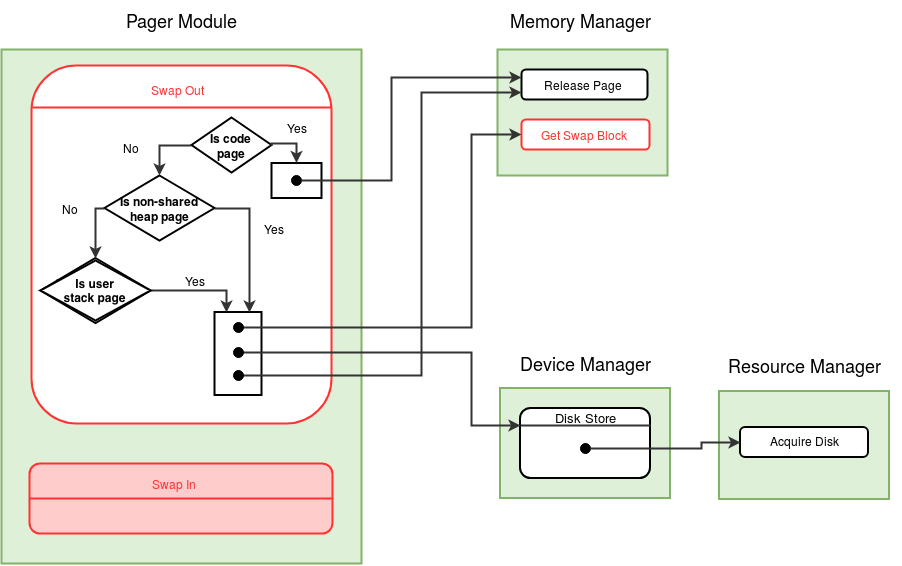
At any time if the OS finds that the available (free) memory drops below a critical level, a swap out is initiated. When available memory pages are less than MEM_LOW, eXpOS calls Swap Out function of pager module. Swap Out function selects a suitable process to swap out to the disk. The memory pages used by the selected process are moved into the disk blocks and the memory pages (except the memory pages of the library) are released. The code pages are not required to be copied to the disk as the disk already contains a copy of the code pages. The kernel stack page of a process is also not swapped out by eXpOS. However, the heap and the user stack pages are swapped out into the disk.
A swapped out process is brought back to the memory under the following conditions -
- A process has remained in swapped out state for more than threshold time
- The available memory pages exceed certain level denoted by MEM_HIGH
Each process has an associated TICK value (see process table) which is reset whenever the process is swapped out. The TICK value is incremented every time the system enters the timer interrupt routine. If the TICK value of a swapped out process exceeds the value MAX_TICK, the OS decides that the process must be swapped in.
When does the OS check for MEM_LOW/MEM_HIGH condition? This is done in the timer interrupt handler. Since the system enters the timer routine at regular intervals, this design ensures that regular monitoring of TICK/MEM_FREE_COUNT is achieved.
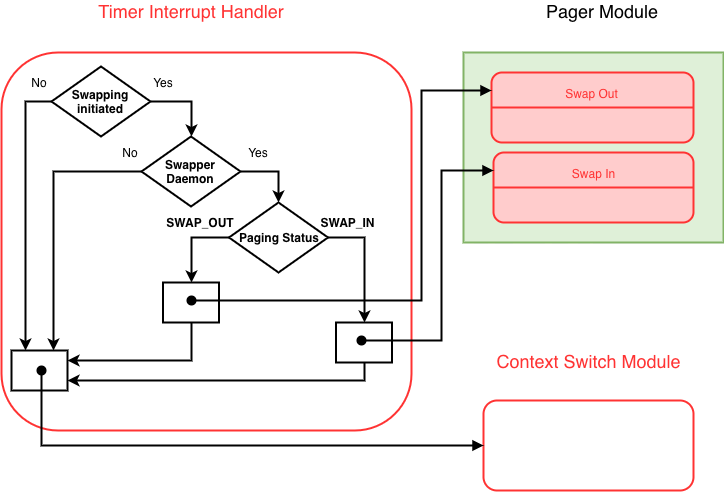
If swap-in/swap-out is needed, the timer will set the PAGING_STATUS field in the system status table to SWAP_IN/SWAP_OUT appropriately to inform the scheduler about the need for a swap-in/swap-out. The timer handler then passes control to the scheduler
The swapper daemon shares the code of the idle process, and is essentially a duplicate idle process running with a different PID. Its sole purpose is to set up a user context for swapping operations.
Switch to the Kernel Stack.     /* See kernel stack management during system calls */
Save the value of SP to the USER SP field in the Process Table entry of the process.
Set the value of SP to the beginning of User Area Page.

Backup the register context of the current process using the BACKUP instruction.


/* This code is relevant only when the Pager Module is implemented in Stage 27 */
If swapping is initiated, /* check System Status Table */
{
    /* Call Swap In/Out, if necessary */

    if the current process is the Swapper Daemon and Paging Status is SWAP_OUT,
        Call the swap_out() function in the Pager Module.

    else if the current process is the Swapper Daemon and Paging Status is SWAP_IN,
        Call the swap_in() function in the Pager Module.

    else if the current process is Idle,
        /* Swapping is ongoing, but the daemon is blocked for some disk operation and idle is being run now */
        /* Skip to the end to perform context switch. */

}

else           /* Swapping is not on now.  Check whether it must be initiated */
{
    if (MEM_FREE_COUNT < MEM_LOW)       /* Check the System Status Table */
        /* Swap Out to be invoked during next Timer Interrupt */
        Set the Paging Status in System Status Table to SWAP_OUT.

    else if (there are swapped out processes)            /* Check SWAPPED_COUNT in System Status Table */
        if (Tick of any Swapped Out process > MAX_TICK or MEM_FREE_COUNT > MEM_HIGH)
            /* Swap In to be invoked during next Timer Interrupt */
            Set the Paging Status in System Status Table to SWAP_IN.

}
/* End of Stage 27 code for Swap In/Out management */


Change the state of the current process in its Process Table entry from RUNNING to READY.

Loop through the process table entires and increment the TICK field of each process.

Invoke the context switch module .

Restore the register context of the process using RESTORE instruction.

Set SP as the user SP saved in the Process Table entry of the new process.
Set the MODE_FLAG in the process table entry to 0.

ireturn.
Pager Module
Choose a process to swap out. (other than the IDLE, Shell or INIT)
    Loop through the Process Table and find a non-swapped process that is in the WAIT_PROCESS state.
    If there are no non-swapped processes in the WAIT_PROCESS state, find a non-swapped process in the WAIT_SEMAPHORE state.
    If there are no non-swapped processes in the WAIT_PROCESS and WAIT_SEMAPHORE state,
            find process with the highest TICK which is not running, terminated, allocated or swapped.

If no such process exists,
        set the PAGING_STATUS back to 0 and return.

Set the TICK field of the process table entry of the selected process to 0.
/* When the process goes to swap, TICK starts again */

Call the release_page() function in the Memory Manager module to deallocate the valid code pages of the process.
Invalidate the Page table entry correpsonding to the code pages.

For each heap page that is not shared and is valid { /* Shared heap pages are not swapped out. */
    Get a free swap block by calling the get_swap_block() function in the Memory Manager module.
    Store the disk block number in the Disk Map Table entry of the process curresponding to the heap page.
    Use the disk_store() function in the Device Manager module to write the heap page to the block found above
    Call the release_page() function in the Memory Manager module to deallocate the page.
    Invalidate the Page table entry correpsonding to the page.
}

Get two free swap block by calling the get_swap_block() function in the Memory Manager module.

Use the disk_store() function in the Device Manager module to write the two stack pages to the disk blocks found above.

Call the release_page() function in the Memory Manager module to deallocate the two pages.

Update the Disk Map Table entry of the process to store the disk block numbers of the stack.

Invalidate the Page table entries correpsonding to the two stack pages.

Set the SWAP_FLAG field in the process table entry of the process to 1.

In the System Status Table, increment the SWAP_COUNT and reset the PAGING_STATUS back to 0.
/* The scheduler can now resume normal scheduling */

return;
/* Find if any swapped out process can be made ready to run if brought into memory. */
Loop through the Process Table and find the swapped process in the READY state with the highest TICK.
If there is no such process in the READY state, reset the PAGING_STATUS field to 0 and Return.

Set the TICK field of the process table entry of the selected process to 0.

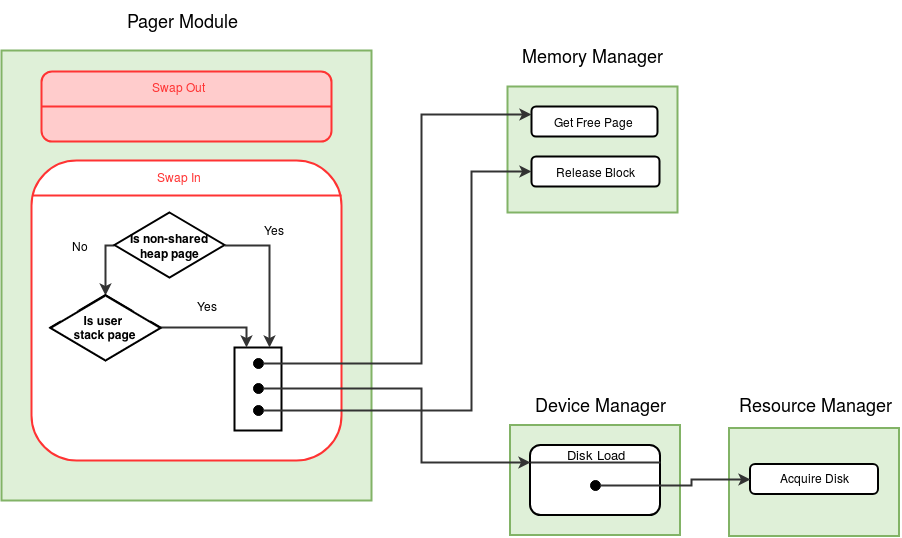
For each heap page that is swapped out { /* Check the Disk Map Table. */
    Call the get_free_page() function in the Memory Manager module to allocate a memory page.
    Get the disk block number in the Disk Map Table entry of the process corresponding to the heap page.
    Use the disk_load() function in the Device Manager module to copy the heap page found above to the memory.
    Free the swap block by calling the release_block() function in the Memory Manager module.
    Set the Page table entry correpsonding to the page. Reference bit is set to 0, valid bit and write bit are set to 1.
    Invalidate the Disk Map Table entry corresponding to the heap page.
}

Get two free memory pages by calling the get_free_page() function in the Memory Manager module.

Use the disk_load() function in the Device Manager module to load the two stack pages to the memory allocated above.

Set the Page table entries correpsonding to the two stack pages. The pages are valid, unreferenced and writable.

Call the release_block() function in the Memory Manager module to deallocate the two swap blocks.

Invalidate the Disk Map Table entry of the process corresponding to the pages.

Set the SWAP_FLAG field in the process table entry of the process to 0.

In the System Status Table, decrement the SWAP_COUNT and reset the PAGING_STATUS back to 0.
/* The scheduler can now resume normal scheduling */

return;
Timer Interrupt
Get the pid of the current process from System Status Table;

Push the BP register of the current process to the top of it's kernel stack.
/* The ExpL application does not push the Base Pointer register (BP). See ExpL calling conventions.
Hence it is saved to the stop of the Kernel Stack */

Save the SP%512, PTBR and PTLR to the Kernel SP, PTBR and PTLR fields of the
Process Table entry of the current process;

if (PAGING_STATUS in the System Status Table is not 0) /* Paging is ongoing */
    If the paging process is blocked     /* the paging process is executing a disk operation */
        Choose Idle Process for scheduling.
    else
        Choose the Swapper Daemon to be scheduled.
else
{
        Find the next non swapped process to schedule using the Round Robin scheduling technique,
        excluding the Swapper Daemon;
        /* Check the SWAP_FLAG in the process table */
            If no process (that is not swapped out) is in  READY or CREATED state, select the Idle process;
}

Set the PTBR and PTLR registers to the corresponding values in the process table entry
of the new process;

Set the new PID in the System Status Table;

if (the new Process is in CREATED state){       /* The process has just been forked from a parent process */

        Set SP to the value of UserSP field in the Process table entry of the new process;
    Set BP to the value stored at the beginning of the kernel stack.
    /* BP value of the process is saved to the beginning of the kernel stack by Fork() system call at process creation. */

        Set the state of the new process as (RUNNING, - );

    Set the MODE_FLAG in the process table entry 0.
        Use ireturn statement to transfer control back to user mode;
}

Set the state of the new process as (RUNNING, - );

Read the KPTR field and the UArea Page number from the Process table entry of the
new process;

Set SP to UArea_Page * 512 + KPTR;

Restore the BP register of the new process from the top of it's kernel stack.

return;