Stage 15
Resource Manager Module (Terminal Output Handling)
Process in eXpOS require various resources like terminal, disk, inode etc. To manage these resource among different processes eXpOS implements a resource manager module (MODULE 0). Before the use of a resource, the process has to first acquire the required resource by calling the resource manager. A process can acquire a resource if it has not been acquired by another resource. The process has to be blocked and another process can be scheduled.
A blocked process must wake up when the resource is available (set all the resource to READY).
The resource manager is responsible for acquiring and releasing the resources.
OS maintains a data structure called the TERMINAL STATUS TABLE. The Terminal Status Table contains details of the process that has currently acquired the terminal. When the process acquires the terminal, the PID of the process is updated in the terminal status table.

Size - 4 words
- STATUS: 0 → Free | 1 → Acquired
- PID: Specifies the PID of the process which is currently using the terminal.
Acquire Terminal → 8 Release Terminal → 9
The function number has to be passed using R1
For both Acquire Terminal and Release Terminal, the PID of the currently running process need to be passed as an argument through the register R2
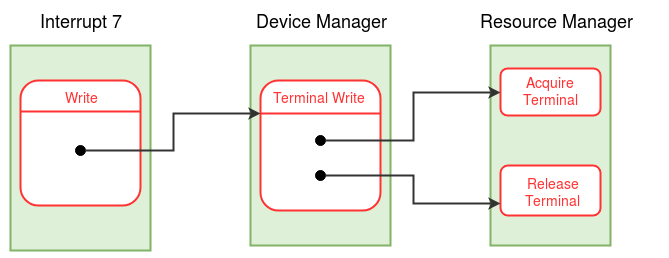
When the write system call is called, Terminal Write in Device Manager Module is invoked and that calls the terminal handling function in Resource Manager Module.
The Terminal Write function acts as an abstract between
Device Manager Module handles Terminal I/O and Disk operations
R1 → 3 (For Terminal Write)
R2 → (PID of the process)
R3 → (Word to be printed)
Since the invoked module will be modifying the contents of the machine registers during its execution, the invoked must save the registers in use into the stack of the process before invoking the module.
The Acquire Terminal function waits in a loop, in which it repeatedly invokes the scheduler if the terminal is not free (BUSY WAIT).
sequenceDiagram
    participant P as Process (User Mode)
    participant W as INT 7 (Write)
    participant M4 as Module 4 (Device)
    participant M0 as Module 0 (Resource)
    participant S as Module 5 (Scheduler)

    P->>W: INT 7 Call
    W->>M4: Terminal Write (Fn 3)
    M4->>M0: Acquire Terminal (Fn 8)
    alt Terminal Busy?
        M0->>M0: Set State = WAIT_TERMINAL
        M0->>S: Call Scheduler
        Note over S: CPU runs other processes...
    else Terminal Free
        M0->>M0: Set Status = 1 (Locked)
    end
    M0-->>M4: Return
    M4->>M4: Execute "print" instruction
    M4->>M0: Release Terminal (Fn 9)
    M0->>M0: Set Status = 0 (Free)
    M0->>M0: Set all WAIT_TERMINAL to READY
    M0-->>M4: Return
    M4-->>W: Return
    W-->>P: IRET to User
Why do we need to lock the resources?
To ensure atomicity, lets say there is a process printing `HELLO WORLD` and another printing `1234`, it atomicity is not ensured, due to context switching, the printing of characters will not be proper