DNS and HTTP
DNS was invented to solve the problem of mapping human-readable names (like google.com) to machine-readable IP addresses (like 142.250.183.46). Before DNS, the internet relied on a single file named hosts.txt maintained by SRI-NIC, which became impossible to manage as the internet grew.
The DNS Name Space
Tanenbaum explains that the internet is divided into a hierarchical tree structure.
-
Tree Structure: The tree starts at an unnamed root (represented by a dot
.). -
Top-Level Domains (TLDs): Directly under the root. There are two types:
-
Generic TLDs:
.com,.edu,.org,.net,.gov,.mil,.int(the originals), plus newer ones like.biz,.info. -
Country Code TLDs (ccTLDs):
.us,.uk,.in,.jp(two letters).
-
-
Domain Names: A domain name is the sequence of labels from the node up to the root, separated by dots (e.g.,
eng.sun.com.).
Resource Records (RR)
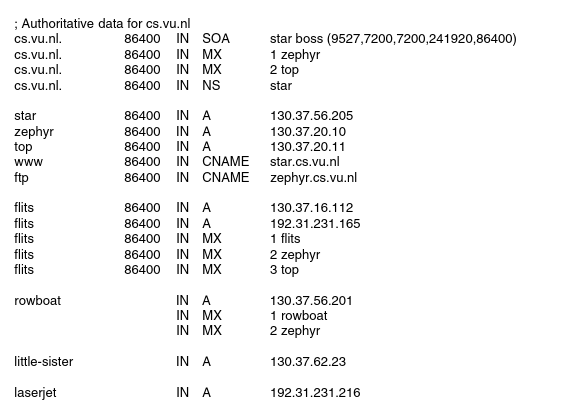
- 5 record tuple - {Domain_Name, Time_to_Live, Class, Type, Value}
1) SOA - Parameters for this zoen (who manages it, version etc.) 2) A - IPv4 Address 3) AAAA - IPv6 Address 4) MX - Mail Exchange 5) NS - Specifies the authoritative name server for the domain 6) CNAME - Creates an alias 7) PTR - Used for reverse lookups
Name Servers & Resolution
The entire DNS Namespace is divided into non overlapping zones.
1) Zones - The DNS namespace for each domain. Each zone has a Primary Name Server and Secondary Name Server
The Resolution Process (Recursive vs. Iterative):
-
Recursive Query: The client asks the local DNS server, "Get me the IP of
x.y.z." The server does all the work and returns the final answer. -
Iterative Query: The server replies, "I don't know, but here is the IP of the server that might know." The client must then query that next server.
HTTP is a simple request-response protocol that normally runs over TCP. It specifies what messages clients may send to servers and what responses they get back in return. The request and response headers are given in ASCII, just like in SMTP. The contents are given in a MIME-like format, also like in SMTP. This simple model was partly responsible for the early success of the Web because it made development and deployment straightforward
Operations to be performed on web pages - HTTP Methods
HTTP Methods (The Verbs): Tanenbaum lists standard methods used in requests:
-
GET: Request a page (most common).
-
HEAD: Request just the header of a page (used to check if a link is valid or when a page was last modified without downloading the body).
-
POST: Send data to the server (e.g., submitting a form).
-
PUT: Upload a page to the server (replace target).
-
DELETE: Remove a page from the server.
Connection Management (Critical Exam Topic): Tanenbaum distinguishes between connection types significantly:
-
Non-Persistent Connections (HTTP 1.0):
-
- Client opens TCP connection.
-
- Client sends HTTP request.
-
- Server sends HTTP response.
-
- Server closes TCP connection.
-
Problem: If a page has 10 images, you need 11 separate TCP connections (1 for text + 10 for images). This is slow because of TCP setup overhead (3-way handshake).
-
-
Persistent Connections (HTTP 1.1):
-
The client establishes a TCP connection and sends a request.
-
The server replies but keeps the connection open.
-
The client can send requests for the 10 images over the same open connection.
-
Benefit: Drastically reduces latency and CPU load.
-
Caching: To reduce traffic, browsers and proxies cache pages.
-
Conditional GET: A client can ask, "Give me this page only if it has changed since this date."
-
Header:
If-Modified-Since: <Date> -
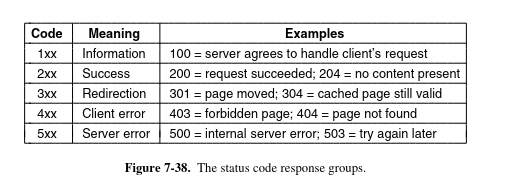
Response: If unchanged, server sends 304 Not Modified (no body data), saving bandwidth.
Message Headers
-
1) User-Agent - Informs the server regarding the implementation of the browser 2) Accept - MIME types, language, compression type etc. 3) Host - Host header names the server. It is taken from the URL 4) Authorisation - Protection 5) Content-Type - Sends the content type of the web page eg. text/html 6) Cookie - Sends cookie to server 7) Set-Cookie - Sends cookie to client
Exam Tip
Key Takeaway for Exam: For HTTP: Understand why Persistent Connections (HTTP 1.1) are better than Non-Persistent (HTTP 1.0) and how the Conditional GET works to save bandwidth.
For DNS: Memorize the Record Types (A, MX, CNAME, NS) and the difference between Recursive and Iterative queries.