Stage 17
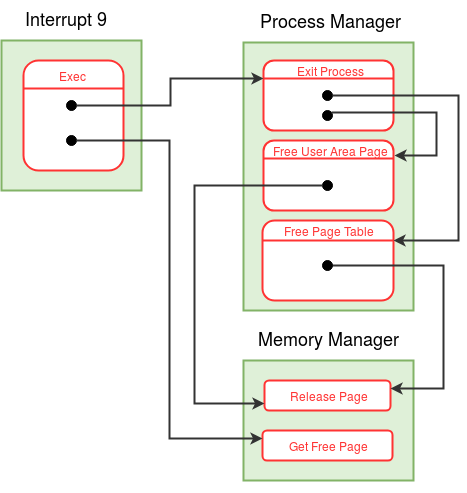
We will be working on exec system call. If the file is an executable, it will destroy the invoking process and loads the file with config. Inode Table is used to retrieve the information of the file.
The newly scheduled process will have the same PID as that of the invoking process. Hence the same process table entry and page table of the invoking process will be used by the newly loaded process. Exec calls Exit Process in the Process Manager Module (MODULE 1) to deallocate the pages.
Get Free Page function is used to acquire the new pages present in Memory Manager Module (Module 2).
eXpOS maintains a data structure called Memory Free List.
1) Exit Process (function number = 3, process manager module)
The function takes PID of a process as an argument, deallocates all the pages of the invoked process. It invokes Free Page Table present in the same module and Free User Area Page in the same module.
2) Free Page Table (function number = 4, process manager module)
The Free Page Table takes PID as the argument and invokes Release Page function in Memory Manager Module. Do not invokes Release Page on library.
3) Free User Area Page (function number = 2, process manager module)
Free User Area Page takes PID of a process as argument, invoking Release Page in Memory Manager Module. The kernel context is not lost because Release Page is non blocking.
4) Release Page (function number = 2, memory manager module)
The Release Page function takes the page number to be released as an argument. System Status Table keeps track of the number of free memory pages available to use in MEM_FREE_COUNT.
- It decrements the corresponding entry in the memory free list
-
This indicates that one process has stopped using the page
-
If the page has become fully free, no process is using the page anymore
-
When the page’s reference count reaches zero, increment
MEM_FREE_COUNTin the system status table. -
The function then checks if any process are in the
WAIT_MEMstate, if such processes exist, change their state toREADY.
5) Get Free Page (function number = 1, memory manager module)
The Get Free Page is responsible for allocating a physical memory page to a process.
- Memory Free List - 0 (free), >0 (page is currently in use by a process)
-
System Status Table - MEM_FREE_COUNT, WAIT_MEM_COUNT
-
The function scans the memory free list, it looks for an entry with
0 -
If a free page is found, increment memory free list, return the page number, and update the MEM_FREE_COUNT
-
If no, the state of the process is changed to
WAIT_MEMand the scheduler is invoked. The process is scheduled again, when the memory is available. The Get Free Page function increments theWAIT_MEM_COUNTbefore changing the state toWAIT_MEM.