Stage 24
Stage 24 introduces system for tracking files in a system
Open system call takes a filename as an argument from the user program. To perform read/write operations on a file, a process must open the file first. Open system call creates a new open instance for the file and returns a file descriptor (index of the new per-process resource table entry created for the open instance).
The global data structure, Open file table keeps track of all the open file instances in the system. (A new entry is created in this table whenever the Open system call is invoked with any file name.)
File status table is a global data structure that maintains an entry for every file in the system (not just opened files).
Open system call creates new entries for the file to be opened in the per-process resource table and the open file table. A process keeps track of an open instance by storing the index of the open file table entry of the instance in (the corresponding) resource table entry. When a file is opened, the OPEN INSTANCE COUNT in the open file table is set to 1 and seek position is initialized to the starting of the file (0).
Each time when a file is opened, the FILE OPEN COUNT in the file status table entry for the file is incremented by one. Open system call invokes Open function of file manager module to deal with global data structures - file status table and open file table . When a process executes a Fork system call, the open instances of files (and semaphores) created by the process are shared between the current process and its child. As an effect of Fork , the OPEN INSTANCE COUNT in the open file table entry corresponding to the open instance is incremented by one.
Deadlocks are prevented by acquiring the resources in a particular order.
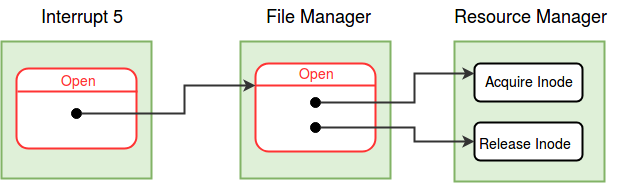
Open Interrupt
    Set the MODE_FLAG in the process table entry to 2,
    indicating that the process is in the open system call.

    //Switch to Kernel Stack - See Kernel Stack Management during System Calls.
    Save the value of SP to the USER SP field in the Process Table entry of the process.
    Set the value of SP to the beginning of User Area Page.

    Find a free Per-Process Resource Table entry.

    Call the open() function from the File Manager module to get the Open File table entry.

    If Open fails, return the error code.

    Set the Per-Process Resource Table entry

    Set the MODE_FLAG in the process table entry to 0.

    Restore SP to User SP.

    Return the index of the Per-Process Resource Table entry.   /* success */
    /* The index of this entry is the File Descriptor of the file. */
Open System in File Manager
Find the index of the Inode Table entry of the file. If the entry is not found, return -1.

Call the acquire_inode() function in the Resource Manager module.   /* Lock the inode */
If the locking fails, return -1.

If the file is of type EXEC, release_inode() and return -1.  /* Only data files can be opened */

Find a free entry in the Open File Table.
If there are no free entries, release_inode() and return -2.  /* Reached maximum number of open files in the system. */

If the file name is "root" then
    Set the INODE INDEX field in the open file table entry to INODE_ROOT.
else
    In the File Status Table, if the File Open Count is -1, set it to 1. Otherwise, increment the File Open Count.
    Set the INODE INDEX field in the open file table entry to the inode table index of the file.

Set the OPEN INSTANCE COUNT to 1 and LSEEK to 0 in the open file table entry.

Call the release_inode() function in the Resource Manager module.   /* Free the inode */

return the Open File Table Index.
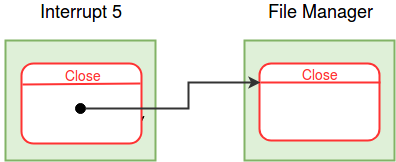
Set the MODE_FLAG in the process table entry to 3,
indicating that the process is in the close system call.

//Switch to Kernel Stack - See Kernel Stack Management during System Calls.
Save the value of SP to the USER SP field in the Process Table entry of the process.
Set the value of SP to the beginning of User Area Page.

If file descriptor is invalid, return -1.    /* File descriptor value should be within the range 0 to 7 (both included). */

Locate the Per-Process Resource Table of the current process.
    Find the PID of the current process from the System Status Table.
    Find the User Area page number from the Process Table entry.
    The Per-Process Resource Table is located at the  RESOURCE_TABLE_OFFSET from the base of the  User Area Page

If the Resource identifier field of the Per Process Resource Table entry is invalid or does not indicate a FILE, return -1.

/* No file is open with this file descriptor. */

Get the index of the Open File Table entry from Per-Process Resource Table entry.

Call the close() function in the File Manager module with the Open File Table index as arguement.

Invalidate the Per-Process Resource Table entry.

Set the MODE_FLAG in the process table entry to 0.
Switch back to the user stack.

Return from system call with 0.    /* success */
Close System Call in File Manager
Find the index of the Inode Table entry of the file from the Open File Table.

In the Open File Table Entry, decrement the Open Instance Count.

If the Open Instance Count becomes 0
    Invalidate the entry by setting all fields to -1.
    If the file is not the "root", decrement the File Open Count in the File (Inode) Status Table.
    If the File Open Count in File Status Table becomes 0, set it to -1.
    /* Check the INODE_INDEX field in the Open File Table entry */

return;
Why don't we need to maintain file open count for the root file? We still need to maintain open instance count for the root file, why?
After acquiring the inode, why do we check if the input file name matches the inode table entry?
Modifications to Fork System Call
While copying the per-process resource table, if the resource is a file, increment the Open Instance Count
Modifications to Free User Area Page
If the resource is valid, invoke the close function in file manager
Read System Call
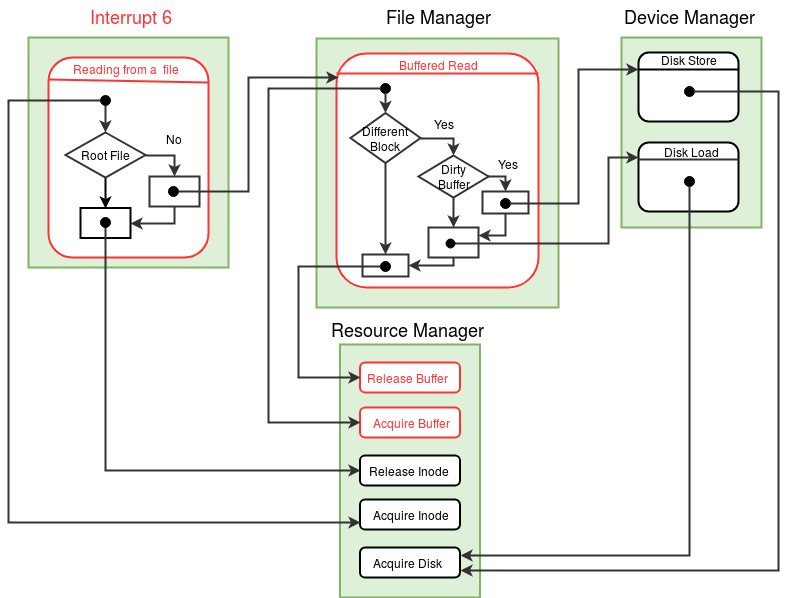
Read system call takes as input a file descriptor and the address of a word into which data should be read. Read system call locks the inode (corresponding to the file descriptor) at the beginning of the system call and releases the lock at the end of the system call. The functions Acquire Inode and Release Inode of resource manager module are used to lock and release the inode respectively.
Read system call reads the word at the position pointed to by the value of LSEEK (in the open file table entry) and stores it into the memory address provided as input. After reading the word from the file, LSEEK is incremented by one.
eXpOS maintains a buffer cache (see memory organization )that can store up to four disk blocks in memory simultaneously. The cache pages are numbered 0,1,2 and 3 and are stored in memory pages 71, 72, 73 and 74.
Reading from the root file does not require a buffer, as root file is already loaded into the memory at boot-time.
Set the MODE_FLAG in the process table entry to 7,
indicating that the process is in the read system call.

//Switch to Kernel Stack - See Kernel Stack Management during System Calls.
Save the value of SP to the USER SP field in the Process Table entry of the process.
Set the value of SP to the beginning of User Area Page.

If input is to be read from terminal    /* indicated by a file descriptor value of -1 */
    Call the terminal_read()function in the Device manager  Module .

/* If not terminal, read from file. */
 else

    If file descriptor is invalid, return -1.    /* File descriptor value should be within the range 0 to 7 (both included). */

    Locate the Per-Process Resource Table of the current process.
    If the Resource identifier field of the Per Process Resource Table entry is invalid or does not indicate a FILE, return -1.
    /* No file is open with this file descriptor. */

    Get the index of the Open File Table entry from the Per Process Resource Table entry.

    Get the index of the Inode Table entry from the Open File Table entry.

    Acquire the Lock on the File by calling the acquire_inode() function in the Resource Manager module.
    If acquiring the inode fails, return -1.

    Get the Lseek position from the Open File Table entry.

    Get the physical address curresponding to the logical address of Memory Buffer address given as input.

    If the File corresponds to Root file ( indicated by Inode index as INODE_ROOT)
                  If the lseek value is equal to the root file size(480), release_inode() return -2.

                  Read from the word at lseek position in memory copy of root file to the translated memory address.
                  /* Use SPL Constant ROOT_FILE */

                  Increment the Lseek position in the Open File Table.
     else
        If lseek position is same as the file size, release_inode() and return -2.  /* End of file reached */

        Find the disk block number and the position in the block from which input is read.
        Read the data from the File Buffer by calling the buffered_read() function in the File Manager module.

        Increment the Lseek position in the Open File Table.

    Release the Lock on the File by calling the release_inode() function in the Resource Manager module.

Switch back to the user stack by resoting USER SP from the process table.
Set the MODE_FLAG in the process table entry of the parent process to 0.

Return 0.   /* success */
Buffered Read
Identify the buffer ;
/* Buffer Number = (Disk Number % 4) is a simple scheme,
good enough for our purposes. More efficient schemes are used in real systems */

Acquire the buffer by calling the Acquire_Buffer() function
in the Resource Manager module;

if (the buffer contains a different disk block){            /* check block number in Buffer Table. */

    if (the buffer contents are dirty){                 /* check DIRTY BIT of buffer table */
            Write back the contents of the buffer
            to the disk by invoking disk_store()
            function in the device manager module;

            Mark the buffer as clean in the
            corresponding buffer table entry;
    }

    Load the required disk block into the buffer by invoking
    the disk_load() function in the device manager module;

    Set the new Disk block number in the Buffer table entry;
}

Copy the contents in the offset location in the buffer to the
physical address given as input;

Release the buffer by calling the Release_Buffer() function
in the Resource Manager module;

return;
Acquire Buffer
while ( Buffer is locked ){   /* Check the Locking PID field in the Buffer Status Table */
    Set state of the process as ( WAIT_BUFFER , Buffer Number );
    Call the switch_context() function from the Scheduler Module.
}

Lock the Buffer by setting the PID of the current process in the Locking PID field
in the Buffer Status Table ;

return;
Release Buffer
If PID given as input is not equal to the LOCKING PID in the Buffer Status Table, return -1.

Free the lock in the the Buffer Status Table entry corresponding to
the buffer Number; /* Set Locking PID field to -1 */
loop through the process table{
       if (the process state is ( WAIT_BUFFER , Buffer Number ) ){
             Set state of process as (READY , _ )
         }
}
return 0;