Notes
Union Mount
Allows files and directories of separate file systems, known as branches to be transparently overlaid, forming a single coherent file system.
Contents of directories which have the same path within the merged branches will be seen together in a single merged directory
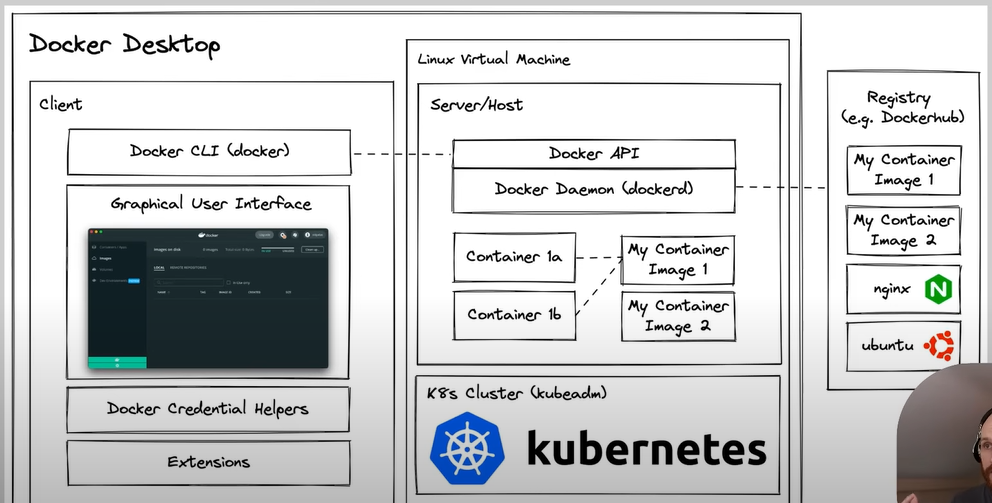
Docker daemon also known as dockerd is a background process that manages the lifecycle of a Docker containers
Storing the data of the container
If data if generated by the application that needs to be persisted, a volume should be used to store that outside of the ephemeral container filesystem.
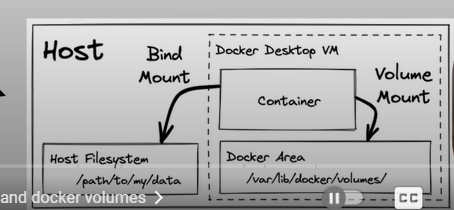
Volume Mounts (Data Persistence)
Managed by Docker Can be used without depending on the host's filesystem
docker volume create my-volume
docker run -it --rm -v my-volume:/data ubuntu bash
On linux, usually in /var/lib/docker/volumes/my-volume/_data
Bind Volume
Uses a specifc direcotyr on the host machine The container gets direct access to that directory Useful for sharing data between the host and the container
docker run -it --rm /home/user/mydata:/data ubuntu bash
DockerFile
A dockerfile is a test document that contains all the commands required to create and assemble a container image.
The Dockerfile is paired with build context, which is usually a folder or directory on your local system containing your source code.
.dockerignore file can be included in the build context to tell Docker to ignore certain files, like node_modules.
Example
RUN apt-get udpate && apt-get install -y <package-name>
docker build -f Dockerfile .
Writing Good Dockerfiles
Start with an Operating System
Install the language runtime
Install any application dependencies
Set up the execution environment
Run the application