Stage 23
File Creation and Deletion
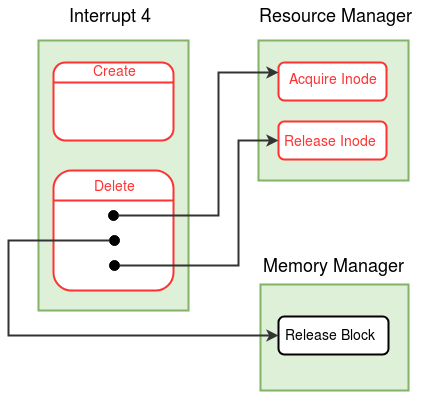
Create system call creates an empty file with the name given as input. Create system call initializes the disk data structures with meta data related to the file. Inode table and root file are the disk data structures used to maintain permanent record of files. Delete system call deletes the record of the file with the given name from inode table and root file. Delete also releases the disk blocks occupied by the file to be deleted. The Shutdown system call is modified to commit the changes made by Create and Delete system calls in the memory copy of the disk data structures back into the disk.
Create System Call
Create System Call takes the filename and the permission as well.
Set the MODE_FLAG in the process table entry to 1,
indicating that the process is in the create system call.

If the file is present in the system, return 0.   /* Check the Inode Table  */

Find the index of a free entry in the Inode Table.
If no free entry found, return -1.   /* Maximum number of files reached */

In the Inode Table entry found above, set FILE NAME to the given file name, FILE SIZE to 0 and FILE TYPE to DATA.
In the Inode Table entry, set the block numbers to -1.  /* No disk blocks are allocated to the file */

Set the USER ID to the USERID of the process /* See the process table for user id */
Set the PERMISSION to the permission supplied as input.

In the Root file entry corresponding to the Inode Table index,
set the FILE NAME, FILE SIZE, FILE TYPE, USERNAME and PERMISSION fields.

Set the MODE_FLAG in the process table entry to 0.

Return from the system call with 0.  /* success */
Delete System Call
Delete System Call takes the filename as the argument from the user program. A file cannot be deleted if it is used by multiple processes.
If any of the disk blocks of the deleted file are in the buffer cache, and if the buffer page is marked dirty, the OS will write back the buffer page into the disk block when another disk block needs to be brought into the same buffer page. However, such write back is unnecessary if the file is deleted The freed blocks may get allocated for another process
Set the MODE_FLAG in the process table entry to 4,
indicating that the process is in the delete system call.

//Switch to Kernel Stack - See Kernel Stack Management during System Calls.
Save the value of SP to the USER SP field in the Process Table entry of the process.
Set the value of SP to the beginning of User Area Page.

Find the index of the file in the Inode Table.

If file is not present in the Inode Table, return 0.

If the file is not a DATA file, return -1.

If the exclusive permission is set
    if the current user is not root and the current user does not own the file
        return -1.

Acquire a lock on the file by calling the acquire_inode() function in the Resource Manager module.

Check if the the file open count is -1 in the  File Status Table . If not, release the lock and return -2.
/* File is open, cannot be deleted */

For each disk block allocated to the file, do {   /* Check Inode Table */
    If the disk block is loaded into a buffer, and the DIRTY BIT is set, reset the dirty bit.
    /* Check the Buffer Table */

    Call the release_block() function in the Memory Manager module to free the disk block.
}

Invalidate (set to -1) the Inode Table of the file.

Update the Root file by invalidating the entry for the file.

Release the lock on the file by calling the release_inode() function in the Resource Manager module.

Switch back to the user stack by reseting USER SP from the process table.
Set the MODE_FLAG in the process table entry of the parent process to 0.

    Return from system call with 0.    /* indicating success */
Acquire Inode
Acquires control over the file
while ( inode is locked ){   /* Check the Lock field in the File Status Table. */
    Set state of the process as ( WAIT_FILE , Inode Index );
    Call the switch_context() function from the Scheduler Module.
}

If inode becomes invalid, return -1. /* File was deleted by the time the inode was acquired */

Lock the Inode by setting the Lock field in the File Status Table
to the PID of the current process.;

return 0;
Release Inode
If PID given as input is not equal to the LOCKING PID in the File Status Table, return -1.

Free the lock in the File Status Table corresponding to the inode index;       /* Set the Lock field to -1 */

loop through the process table{
       if (the process state is ( WAIT_FILE, Inode Index ) ){
             Set state of process as (READY , _ )
         }
}
return 0;
Disk Store
Stores the contents of a page back to disk
Acquire the lock on the disk device by calling the Acquire_Disk() function
in the Resource Manager module;

Set the LOAD/STORE BIT, PAGE NUMBER and BLOCK NUMBER in the Disk Status Table.

Use the store statement to store the memory page to disk;

Set the state as (WAIT_DISK, - );

Call the switch_context() function from the Scheduler Module.

return;
Shutdown Interrupt
Using Disk Store, store back the Disk Free List, Inode Table, Root file
File Status Table
The File Status Table contains details about lock status and file open count of each file in the inode table.

Buffer Table
When a process reads/writes into a file, the relevant disk block is first brought into a memory buffer by the OS and the read/write operation is performed on the buffer. The dirty bit indicates whether the page has been modified.
Buffer_number = Disk_block_number % MAX_BUFFER
