Introduction
Java can be executed in any machine with JVM
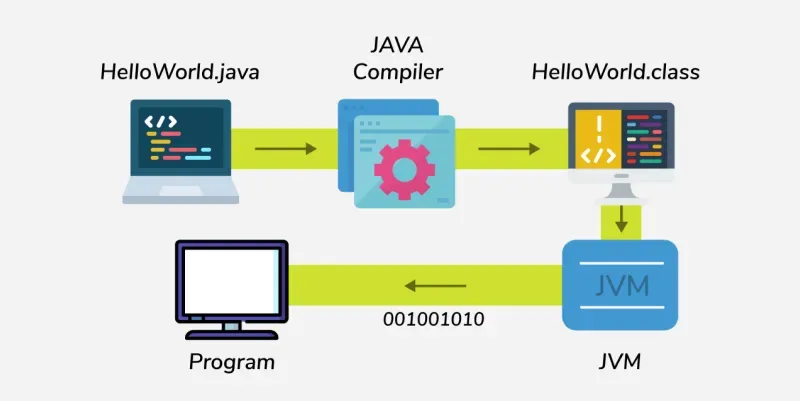
Components
- JVM (Java Virtual Machine) - Engine that runs the Java programs. It converts Java bytecode into machine code
- JRE(Java Runtime Environment) - JRE = JVM + libraries + other components needed to run Java applications.
- JDK (Java Development Kit) - JDK = JRE + Development Tools.
Data Types
- Primitive - byte, short, int, long, float, double, char, boolean
- Non-primitive - String, Arrays, Classes, Interfaces, Objects
public class DataTypesDemo {
    public static void main(String[] args) {

        // -------- Primitive Data Types --------
        byte b = 100;              // 1 byte
        short s = 30000;           // 2 bytes
        int i = 100000;            // 4 bytes
        long l = 10000000000L;     // 8 bytes

        float f = 3.14f;           // 4 bytes
        double d = 3.14159265359;  // 8 bytes

        char c = 'A';              // 2 bytes (Unicode character)
        boolean flag = true;       // 1 bit

        // -------- Non-Primitive Data Types --------
        String str = "Hello, Java"; // String (class in Java)
        int[] arr = {1, 2, 3, 4, 5}; // Array
        Integer wrapperInt = Integer.valueOf(50); // Wrapper class example
        StringBuilder sb = new StringBuilder("Java"); // Class object

        // -------- Output --------
        System.out.println("byte: " + b);
        System.out.println("short: " + s);
        System.out.println("int: " + i);
        System.out.println("long: " + l);
        System.out.println("float: " + f);
        System.out.println("double: " + d);
        System.out.println("char: " + c);
        System.out.println("boolean: " + flag);

        System.out.println("String: " + str);
        System.out.print("Array: ");
        for (int num : arr) {
            System.out.print(num + " ");
        }
        System.out.println();

        System.out.println("Wrapper Integer: " + wrapperInt);
        System.out.println("StringBuilder: " + sb);
    }
}