✅ Core Java Fundamentals
- Variables, Data Types, Operators
- Control Flow (
if,switch, loops) - Methods (overloading, parameters, return types)
- Arrays & Strings
- Exception Handling (
try-catch-finally,throw, custom exceptions)
🏛️ Object-Oriented Programming (OOP)
- Classes & Objects
- Inheritance (
extends, overriding) - Polymorphism (compile-time & runtime)
- Encapsulation (private fields, getters/setters)
- Abstraction (
abstract class,interface)
📚 Java Collections Framework
-
List→ArrayList,LinkedList -
Set→HashSet,TreeSet -
Map→HashMap,TreeMap - Iterators & for-each loops
- Streams (basic usage)
🧩 Generics
- Why use generics (
List<String>vsList<Object>) - Create generic classes & methods
📂 Java I/O & Serialization
- File handling (
FileReader,BufferedReader) - Serialization (
Serializableinterface) - JSON parsing (Jackson basics)
🔀 Java Concurrency (Basics)
-
Threadclass &Runnableinterface -
ExecutorService -
synchronizedkeyword
🆕 Java 8+ Features
- Lambda Expressions
- Functional Interfaces (
Consumer,Predicate,Supplier) - Streams API (
map,filter,reduce) - Optional
🏷️ Annotations & Reflection
- Built-in annotations (
@Override,@Deprecated) - Create custom annotations
- Reflection basics
⚒️ Build Tools
- Maven basics
- Gradle basics
📂 Mini-Projects Before Spring Boot
- Student Management System (Console App) – CRUD with Collections
- File-based Todo App – Read/write tasks from a file
- Multithreaded Downloader – Use threads for multiple downloads
- Library Management System – OOP + Collections + Exception handling
🌱 Ready for Spring Boot?
- Install JDK + Maven/Gradle
- Build Hello World Spring Boot project
- Create your first REST API (
@RestController) - Connect Spring Boot with Database (JPA + MySQL/Postgres)
- Deploy a simple Spring Boot app (local/Heroku/Docker)
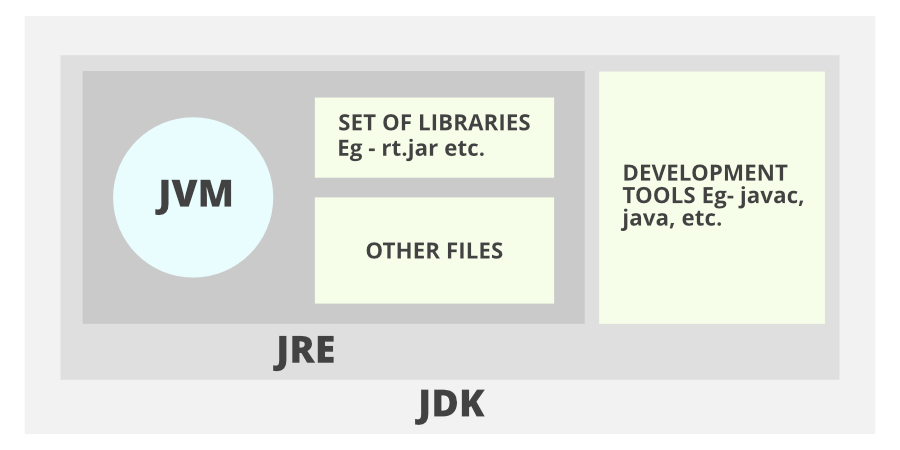
👉 Resource: Java Tutorial (W3Schools) JDK - Java Development Kit, set of development tools and libraries used to create Java programs. Works together with JVM and JRE to run and build Java applications. (JRE, javac, debugger etc.)
Converts .java to .class - Class Loader - Byte Code verifier - Interpreter (Executes Byte Code and make appropriate calls to the hardware)
JRE - Java Runtime Environment, provides an environment to run Java programs on the system. The environment includes standard libraries and JVM (rt.jar etc)
JVM - Java Virtual Machine, responsible for executing Java program. (ClassLoader, JIT, Compiler, Garbage Collector) (converts bytecode into native machine code). (Interpreter)
Data Types
- Primitive Data Types
boolean
char
byte
short
int
long
float
double
- Non Primitive Data Types
These are reference types that store memory addresses of objects (SACIO)
String
Array
Class
Interface
Object
public class Geeks {
    public static void main(String[] args) {
        int p = 20000;
        int d = 15000;

        System.out.println(p);
        System.out.println(d)
    }
}
String cannot be modified after creation, use StringBuilder for heavy string manipulation
class Car {
    String model;
    int year;
    Car(String model, int year) {
        this.model = model;
        this.year = year;
    }
    void display() {
        System.out.println(year);
    }
}

public class Geeks {
    public static void main(String[] args) {
        Car myCar = new Car("Toyota", 2025);
        myCar.display();
    }
}
interface Animal {
    void sound();
}

class Dog implements Animal {
    public void sound() {
        System.out.println("Woof")
    }
}

public class InterfaceExample {
    publis static void main(String[] args) {
        Dog myDog = new Dog();
        myDog.sound();
    }
}
public class Geeks {
    public static void main(String[] args) {
        int[] num = {1,2,3,4,5};
        String[] arr = {"Geeks", "Geeks2", "Geeks3"};

        System.out.println("First number: " + num[0]);
        System.out.println("Second Number: " + num[1]);
    }
}
Number arrays in Java are initialized to 0 by default.
Scanner
Scanner sc = new Scanner(System.in)
sc.nextInt();
sc.nextLine();